Audience Insights Set Up
Last updated: October 19, 2026
Audience Insights gives marketers full visibility into how their audience is exploring their website before, during, and after the event.
Overview
Sequel's website analytics toolkit helps you track page views and user interactions while respecting privacy regulations. The below process has to be completed first before any data can flow. Please review in full.
Quick Start
If you're ready with knowledge and just need the script, we kept it simple.
To ensure you don't run into any issues, please review the installation portion below.
// Initialize without tracking

Sequel.init('your-company-id');


// Enable tracking when user consents

Sequel.initializeTracking();
Installation
Add the Sequel script to your HTML:

// Add script to website Core Features
1. Basic Tracking Setup
Initialize Sequel without tracking:
Sequel.init('your-company-id');Enable tracking after user consent:
Sequel.initializeTracking();This will:
Set a consent cookie
Generate anonymous user/session IDs
Begin tracking page views
Track user identification events
Disable tracking:
Sequel.disableTracking();Google Tag Manager Integration
You can also implement Audience Insights using Google Tag Manager.
Go to Analytics -> Audience Insights and click on Setup Tracking Code to copy your company-specific snippet. Make sure you are in the "Google Tag Manager" tab within the pop-up.
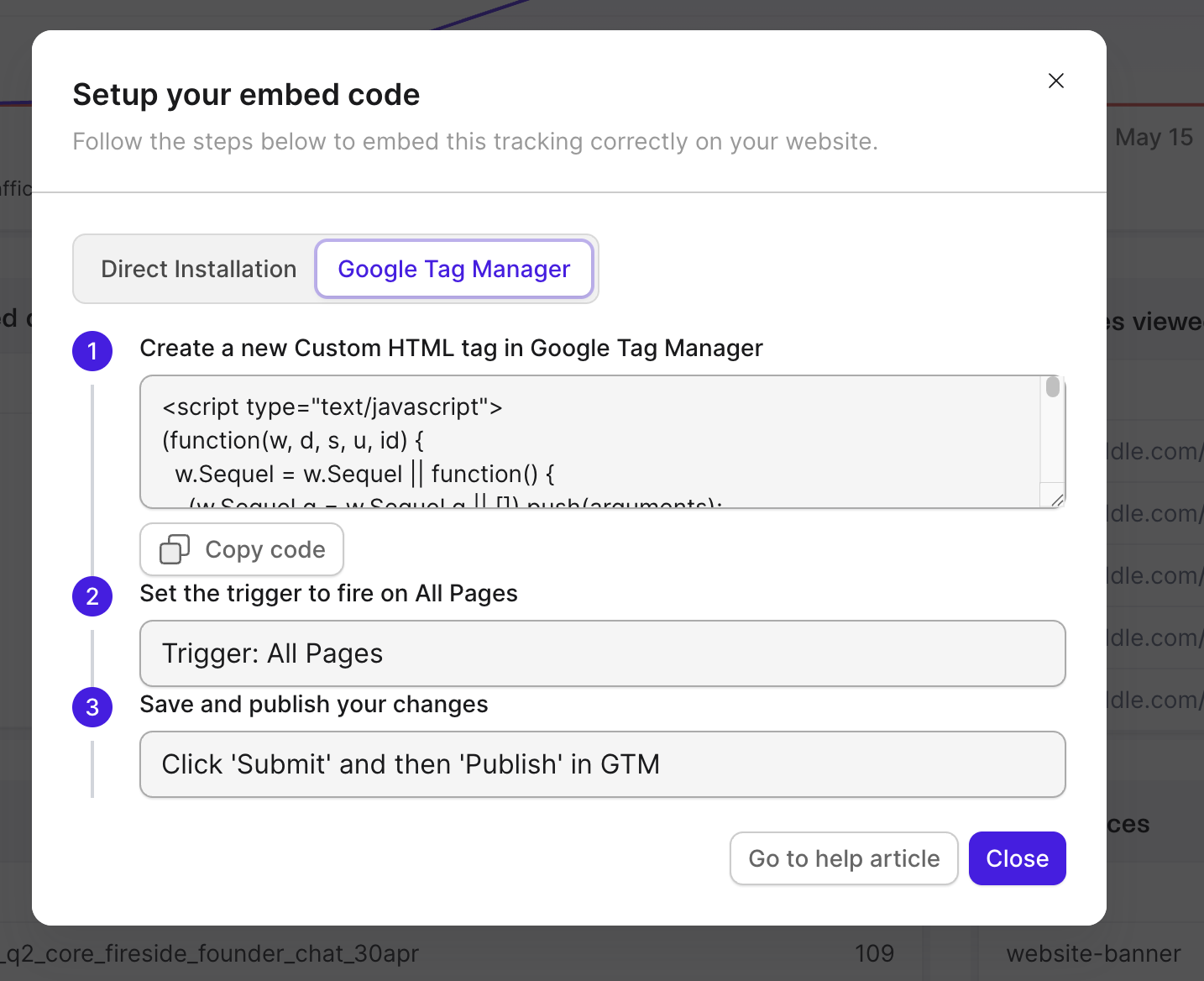
⚠️ Important: Make sure you only call Sequel.initializeTracking() if the user has already granted consent. If you're using a Consent Manager, see the examples below.
Integration Examples
With Ketch
// Initialize without tracking

Sequel.init('your-company-id');


window.ketch?.ready().then(() => {

 window.ketch?.getConsent().then((consent) => {

  if (consent?.purposes?.analytics?.allowed) {

   Sequel.initializeTracking();

  }

 });


 // Listen for consent changes

 window.ketch?.addEventListener('consentChanged', () => {

  window.ketch?.getConsent().then((consent) => {

   if (consent?.purposes?.analytics?.allowed) {

    Sequel.initializeTracking();

   } else {

    Sequel.disableTracking();

   }

  });

 });

});
With OneTrust
// Initialize without tracking

 Sequel.init('your-company-id');


 OneTrust?.onConsentChanged(function(category) {

  if (category.Analytics) {

   Sequel.initializeTracking();

  } else {

   Sequel.disableTracking();

  }

});
With Cookiebot
// Initialize without tracking

 Sequel.init('your-company-id');


 window.addEventListener('CookiebotOnAccept', function() {

  if (Cookiebot.consent.statistics) {

   Sequel.initializeTracking();

  }

});
Manual Consent Implementation
// Initialize without tracking

 Sequel.init('your-company-id');


 document.getElementById('acceptAnalytics').addEventListener('click', function() { Sequel.initializeTracking();

});


 document.getElementById('rejectAnalytics').addEventListener('click', function() { Sequel.disableTracking();

 });
Cookie Management
The toolkit uses these cookies:
sequel-consent: Tracks consent statussequelUserId: Anonymous user IDsequelSessionId: Session tracking
All cookies are set with:
Secure flag
SameSite=strict
1-year expiration (consent/user) or 1-day (session)
Best Practices
Privacy & Consent
Always get explicit consent before enabling tracking
Use
initializeTracking()only after consentCall
disableTracking()when consent is withdrawnRespect user privacy choices
Implementation
// ❌ Don't automatically enable tracking

 Sequel.init('company-id');

 Sequel.initializeTracking(); // Wrong!


// ✅ Do wait for consent

 Sequel.init('company-id');

 consentManager.onAccept(() => {

  Sequel.initializeTracking();

});
Troubleshooting
Common Issues
Tracking not working:
// Verify initialization

 console.log(Sequel.hasConsent); // Should be true

 console.log(Sequel.userId); // Should exist
Missing user data:
Check identify calls
Verify consent status
Monitor network requests
API Reference
Core Methods
// Initialize SDK

 Sequel.init(companyId: string): void


// Enable tracking with consent

 Sequel.initializeTracking(): void


// Disable tracking

Sequel.disableTracking(): void


// Identify user

 Sequel.identify(

  email: string,

  details?: {

   name?: string;

   companyName?: string;

   title?: string;

 }

): void
Support
For additional help:
Documentation: help.sequel.io
Email: support@sequel.io
Status: status.sequel.io
Remember to:
Always get consent before tracking
Test in development environment first
Monitor your implementation
Keep privacy regulations in mind